
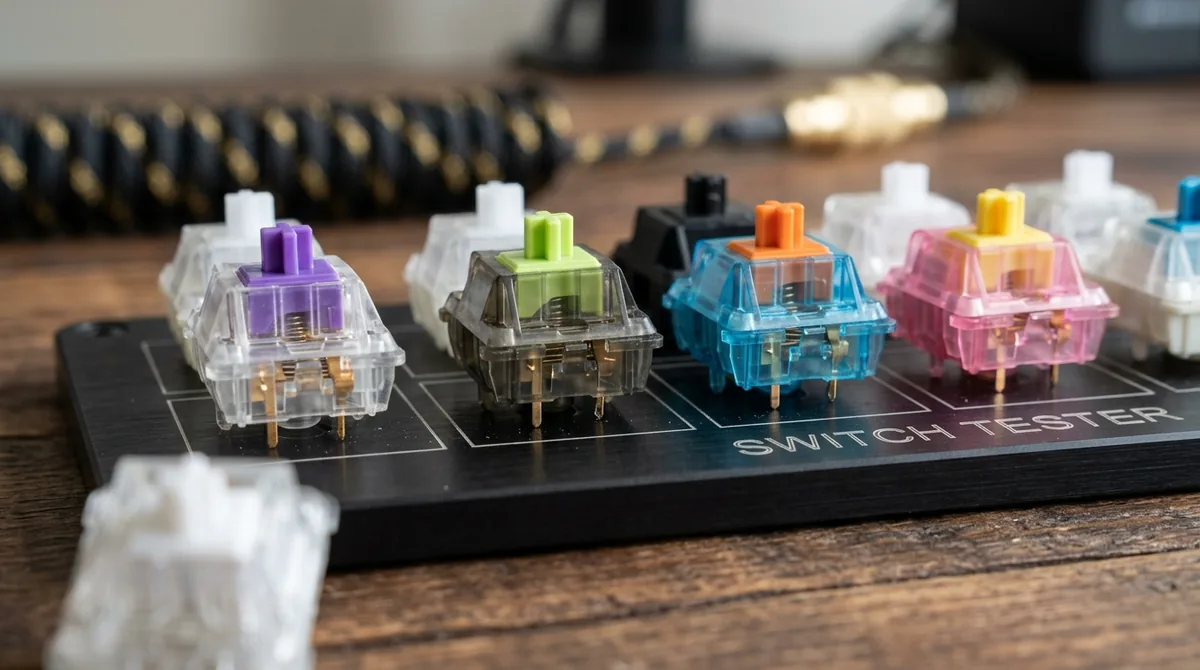
For knowledge workers, software developers, and writers spending eight or more hours daily typing, the computer keyboard represents the primary physical interface with the digital domain. While budget computers rely on cheap elastomeric rubber dome membranes that provide inconsistent tactile feedback and encourage forceful bottoming out, enthusiast mechanical keyboards utilize independent mechanical switch mechanisms beneath every keycap. Selecting an optimal switch requires looking beyond basic marketing categories (Red, Brown, Blue) to understand the physical mechanics of force curves, actuation travel, and spring dynamics.
The Triad of Switch Architectures: Linear, Tactile, and Clicky
Mechanical switches are categorized by how they modulate mechanical resistance as the stem descends along its vertical housing:
1. Linear Switches (e.g., Red, Black, Yellow)
Smooth, uninterrupted downward travel from the resting position down to the bottom-out point. There is no physical bump or click to signal actuation. Highly favored by competitive gamers for rapid double-tapping and by typists who prefer effortless, uniform keystrokes.
2. Tactile Switches (e.g., Brown, Clear, Panda)
Features an engineered protrusion (tactile bump) along the stem slider legs. As the stem descends, resistance increases progressively up to a defined tactile peak, followed by a sudden mechanical drop in resistance precisely as the electrical contact leaf closes. This physical tactile event informs the typist's fingertips that the character has registered, allowing them to release the key without bottoming out.
3. Clicky Switches (e.g., Blue, White, Jade)
Combines tactile resistance with an audible acoustic snap. Early designs utilized a two-piece slider jacket, while modern switches utilize a hardened spring-steel click bar struck by the descending stem, delivering a crisp acoustic report and distinct tactile feedback.
| Switch Category | Actuation Force (cN / gf) | Pre-Travel Distance | Total Travel Distance | Acoustic Profile |
|---|---|---|---|---|
| Standard Linear | 45 – 50 gf | 2.0 mm | 4.0 mm | Quiet / Deep "Thock" |
| Speed / Gaming Linear | 40 – 45 gf | 1.0 – 1.2 mm | 3.0 – 3.5 mm | Moderate clack |
| Light Tactile | 45 – 55 gf | 2.0 mm | 4.0 mm | Muted tactile bump |
| Heavy Tactile (Panda) | 62 – 67 gf | 1.8 – 2.0 mm | 3.2 – 3.6 mm | Sharp, pronounced tactile snap |
| Click Bar (Kailh Box) | 50 – 60 gf | 1.8 mm | 3.6 mm | Sharp, loud metallic snap |
Deconstructing the Force Curve: Pre-Travel, Actuation, and Bottom-Out
A force-displacement curve is the definitive engineering blueprint of a mechanical switch:
- Resting Position (0 mm): Initial preload force exerted by the uncompressed internal spring (typically 30 to 40 gf).
- Pre-Travel Distance: The vertical travel required for the stem to push the internal phosphor-bronze contact leaf closed, completing the electrical circuit (standard Cherry MX spec is 2.0 mm).
- Tactile Peak: In tactile switches, the point of maximum mechanical resistance before the bump releases (e.g., 65 gf). The sharpness of the tactile event is determined by the slope angle of the stem leg cam.
- Bottom-Out Force: The maximum force required to compress the spring fully until the stem collides solidly with the floor of the housing (typically 60 to 80 gf).
Spring Physics: Progressive, Slow-Curve, and Multi-Stage Springs
The internal coiled wire spring governs the typing feel across the keystroke:
- Linear Springs: Standard pitch coils that exhibit Hooke's Law: resistance scales linearly with distance.
- Progressive Springs: Feature tightly wound coils at one end that compress first, followed by wider coils. This creates a soft, effortless initial keypress that ramps up steeply toward the bottom, cushioning fingertip impact and preventing joint fatigue.
- Multi-Stage (Extended) Springs: Extra-long springs (20 to 22 mm) installed under heavy pre-compression within the standard 15 mm housing. This eliminates "loose" initial travel, providing high initial fingertip support and rapid switch reset for fast touch-typing.