
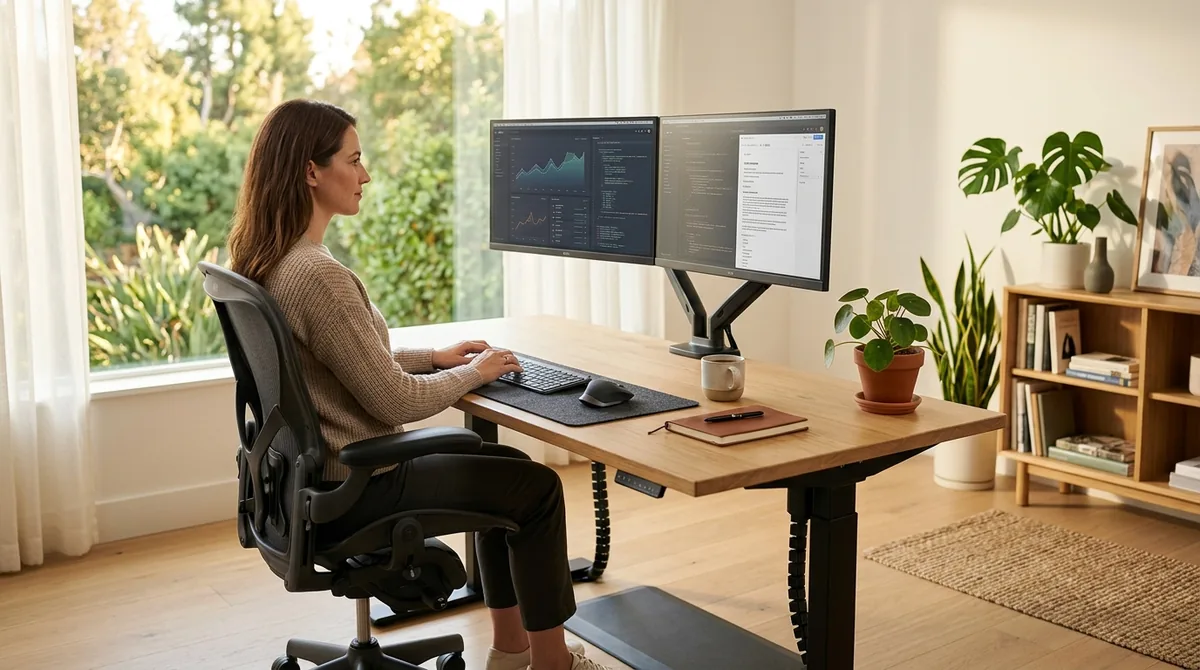
Prolonged computer work frequently causes repetitive strain injuries (RSI), cervical spine compression, and lumbar fatigue when workstations are improperly adjusted. The Occupational Safety and Health Administration (OSHA) and human factors engineering standards (such as ANSI/HFES 100) emphasize the maintenance of "neutral body postures"—alignments that minimize mechanical joint loading, reduce tendon friction, and optimize circulation throughout long shifts.
1. Biomechanical Fundamentals: The Neutral Posture Model
A neutral posture maintains the natural S-curve of the spine and keeps joints aligned within their mid-range of motion:
| Anatomical Zone | Ergonomic Alignment Target | Common Ergonomic Maladjustment | Physiological Consequence |
|---|---|---|---|
| Cervical Spine (Neck) | Head balanced directly above shoulders; vertical gaze declined 15°–20° | Monitor positioned too low (laptop on flat desk) | Excessive forward head posture; trapezius muscle spasm |
| Upper Limbs (Elbows) | Forearms horizontal, elbows bent at 90°–100° resting close to torso | Desk surface too high; reaching forward | Chronic shoulder elevation and rotator cuff fatigue |
| Wrists and Hands | Straight, neutral alignment; hands level with forearms | Wrists resting bent upward on hard desk edge | Carpal tunnel compression of the median nerve |
| Lumbar Spine | Full contact against firm lumbar support maintaining lordotic curve | Slouching forward; chair backrest angled too far back | Elevated intradiscal pressure in L4/L5 lumbar vertebrae |
| Lower Limbs (Knees/Feet) | Thighs horizontal; feet resting flat on floor or solid footrest | Seat pan too high; feet dangling unsupported | Popliteal pressure restricting lower-leg venous return |
2. Step-by-Step Workstation Adjustment Sequence
Do not adjust your desk first; ergonomic calibration must always start with your seating position relative to the floor:
- Step 1: Seat Height Calibration: Adjust chair cylinder height until your feet rest firmly and flatly on the floor, with knees bent at approximately 90 degrees. Ensure a 2- to 3-finger gap between the front edge of the seat pan and the back of your knees to prevent blood flow restriction.
- Step 2: Lumbar Support Depth and Height: Position the convex lumbar cushion directly into the small of your lower back (at belt line level), angling the backrest between 100° and 110° to distribute upper-body weight across the backrest.
- Step 3: Keyboard and Mouse Surface: Lower your desk (or raise an adjustable keyboard tray) until your forearms are parallel to the floor with shoulders completely relaxed. The keyboard should feature a slight negative tilt (slanted gently downward away from you) to keep wrists straight.
- Step 4: Monitor Distance and Elevation: Place the primary display directly in front of you at arm's length (50 cm to 75 cm). Elevate the monitor so the top third of the screen aligns directly with eye level. If you wear bifocal or progressive lenses, lower the display slightly to avoid tilting your chin upward.
3. Laptop Pitfalls and Movement Protocols
Laptops present a fundamental ergonomic contradiction: the keyboard and display are physically fused. If the screen is at eye level, the keyboard is too high; if the keyboard is at elbow height, the screen forces neck flexion.
- Mandatory Laptop Peripherals: When working at a desk for more than one hour, elevate the laptop on a stand and attach an external keyboard and separate mouse.
- The 20-20-20 Visual Rule: Every 20 minutes, shift your focal gaze to an object at least 20 feet away for at least 20 seconds to relax ciliary eye muscles.
- Postural Variety: Even an ergonomically flawless posture becomes fatiguing if maintained statically for eight hours. Alternate between seated and standing positions, changing your posture at 30- to 60-minute intervals.